Taming dragons
After the CSRG had stopped any BSD work, the responsibility of providing a working BSD system for the VAX architecture belong to NetBSD.
Although the original work was targeting earlier, physically huge, systems, as well as the low-end workstations (such as the VAXstation 2000), the efforts of Matt Thomas of NetBSD, Michael Kukat and the late Bertram Barth from 1998 to 2001 led to added, or improved support, for many more "modern" workstation models, such as the VAXstation 3100 series as well as most of the VAXstation 4000.
After OpenBSD had split from NetBSD, there had been no real work on the VAX support in OpenBSD, apart from the occasional code sync with NetBSD and some unreleased builds by Mats O. Jansson, until the year 2000, where (back then) medical student Brandon J. Creighton developed interest in VAX hardware, and working closely with Hugh Graham, they did the necessary work to make OpenBSD/vax running reliably, and OpenBSD 2.8, to be released on december 1st, 2000, would be the first release with official VAX support.
At that time, I did not own any VAX hardware myself yet. I had had the opportunity to get a MicroVAX II sometime in 1999 but preferred to decline, given the huge size of the machine and its lack of horsepower (we're talking about a 5MHz machine which can only have up to 16MB of memory, but scarcely comes with more than 8). But as the OpenBSD/vax port was becoming a reality, I wanted to be able to help, if only by testing things, or fixing the bugs I would notice.
In late october 2000, on the local auction site ``iBazar'' (which would end up being bought by eBay a few months later), I spotted a listing for a "VAX model 3100, 300MB hard drive, 21" display". Since there was a display, it was a VAXstation 3100 (as opposed to a MicroVAX 3100, had it no graphics capabilities), but unsure which model. In any case, all VAXstation 3100 models were supposed to be able to run both NetBSD and OpenBSD, so I placed a bid for it.
Unsurprisingly, I ended up being the only bidder for a meager FF 500 (about EUR
80), and since the machine was located about 5 hours away from my place
(it was located in
Saint-Pierre-de-Rivière,
close to
Foix,
where there is a
Siemens factory,
and I have good reasons to believe this machine came from it), I ended
up driving back and forth on november 1st to grab it, which costed me almost the
same amount of money in gas as I had paid for the machine.
(I was still young enough to be able to drive 10
hours in a day and not be much tired in the evening, back then.)
That evening, on the OpenBSD developer's chatroom, I had a private conversation with Hugh Graham:
*miod* hey, I got my vax
*hugh* sweet, is it ready to go?
*miod* not yet. first, I've to remove the dust.... Second, I've not
       finished d/loading the latest vax snap
*hugh* ok.. you'll also need ftp://XXX.XX.X.XX/pub/OpenBSD/vax/bsd.rd
*hugh* test the install...
*miod* ok, grabbing it...
*hugh* md parts were hacked together just last couple days, and I didn't have
       a machine to test install on myself..
*miod* BTW how much disk space is needed for a complete vax install ? machine
       comes with an rz24 and the rx23 floppy
*hugh* should fit on rz24...
*hugh* I have a floppy28 you can test too..
*hugh* Hmm, you can try the one on the ftp.. Totally untested..
*hugh* (My vax has a floppy drive, but it eats floppies..)
*miod* d/loading everything from XXX.* instead of cvs:~ftp finally.
*hugh* Is it faster? should be the same tars..
*miod* I was not sure, but I was just starting to d/l the tarballs so this
       doesn't matter.
*hugh* Ok.. this way I know when to nag you at least. Go vacuum your vax. :)
*miod* tomorrow. Too tired right now (12x5hours drive to go get it)
*hugh* ok :)
*miod* err... 2x5hrs, that is
The day after, I set up the machine, which had turned out to be a VAXstation 3100m38 (with a 25MHz processor), connected the display and the keyboard, booted the OpenBSD installation kernel from the network, and then... nothing happened.
I reported this disappointment to Hugh Graham, who told me that, at this point, the OpenBSD/vax kernel did not have support for graphics console, and that I should use a serial console until things would improve. That shouldn't have been an issue, except for a major problem: serial ports on VAX hardware do not use commonly encountered DB-25 or DE-9 serial port connectors, as found on the IBM PC clones and many workstations of the 1990s, but Digital's own Modified Modular Jack connectors. And I had neither MMJ cables nor MMJ-to-DB-25 adaptors.
Therefore, the immediate side quest was to find myself a working serial connection to that machine. After a few days, I was considering doing a horrible home job.
*miod* I think I'll hack (physically) jack cables to build an mmj cable, when I
       find time (I'm moving over the next week)
*hugh* The easiest way I've found is to take a 6 conductor rj13 (iirc) phone
       connector, and cut the tab off of it (mmj's are offset tab), then cut it in
       half and crimp a rj-45 on. Center the 6 conductors in the rj-45.
*hugh* Then use a regular rj-45 to db-9 converter to connect the vax to your pc.
*hugh* I have a couple of those, and they work fine..
*hugh* Best solution is to get some real mmj cables and get one vax working as
       a terminal server for the others, though.
On november 14th, I dropped by the "MU JU"
(Matériel Usagé de l'atelier JU - ``used hardware of JU workshop''),
a small warehouse within the
Michelin tire factory in
Clermont-Ferrand,
were used hardware was sold to bystanders at smaller-than-meager prices.
It was open only one or two days a week, during lunch hours only, and you could
wander in the warehouse and pick used (but not necessarily unusable) tools,
even furniture (filing cabinets, drafting tables, heavily worn out office
chairs). And near the end of the 1990s, computer parts started to
appear - I once found a complete
Apollo DN3500 machine,
but the case and power supply, as parts scattered across a dozen of different
bins - and a friend of mine used
to drop by from time to time, hoping to be able to score a
SPARCstation,
as such machines had started to appear on an irregular basis (we later
got a lot of 10 such machines (a few SPARCstation 1+, 2, 10 and 20) for the
ridiculous price of FF 2,000 - less than EUR 300.)
So, on that day, I joined my friend during the lunch break to visit the "JU" (as
it was better known among its regular visitors), and although we did not see any
Sun hardware, we had been able to talk to the Michelin employees running the JU,
and got a verbal agreement that, if we were to come back in 3 to 4 weeks,
they would have picked some used Sun gear by then (which turned out to be the
lot of 10 machines I mentioned earlier). But glancing at the 100s
of plastic bins filled with random tools, I was extremely lucky to spot an MMJ
connector. Lifting it, it turned out this was an MMJ to DB-25 cable, exactly
what I was looking for. I picked the cable, ended up paying a ridiculous price
for it (FF 5, less than EUR 1), and hoped my VAX journey could continue.
Date: Tue, 14 Nov 2000 23:53:53 +0000
From: Miod Vallat
To: Hugh Graham
Subject: I'm lucky...
Hello,

  I've found myself an mmj cable this morning, but I don't know yet if
it is working.
[...]
Since I'm currently moving flats, the vaxstation is off in a spare room
in the new flat, waiting for the machine room floor to be ready. I hope
to be able to bring it back to life during this week-end.
Of course, things would not be as easy as I would have liked them to be. Using that cable, I got no output on the other side of the serial connection. The cable could be faulty, but there was also a possibility that it was not wired as a serial cable, as there were multiple flavours of MMJ cables with different wiring. After tinkering with a multimeter to figure out its wiring, it was clear I had picked a printer cable. The next step was to cut it at the DB-25 end, and rewire the pins there.
*hugh* how has gone your vax, btw?
*miod* the MMJ cable I got my hands on is a printer cable. I'm about to rewire the
       non-MMJ end to use it as serial.
*miod* in the meantine I've finished downloading the old snapshot.
*hugh* cool.. I can make up a fresh kernel/boot code snap if you want to try current..
       (and to confirm that the 16 slice xxboot works on your system)
*miod* wait for me to have a working system first - and I can live with 8 slices (-:
*hugh* ok :)
Unfortunately, after rewiring the cable, I still did not get any output. So I checked what I had done with Hugh.
Date: Sun, 10 Dec 2000 00:37:16 +0000
From: Miod Vallat
To: Hugh Graham
Subject: MMJ wiring ?

Hello,

  I've had no luck with my MMJ wiring experiments. The console of the
vax is correctly redirected to the printer port, but I don't get
anything on the other side... SO, I'm not sure if the wiring information
I got was correct. Do you by chance have known-to-be-working information
on wiring an MMJ cable to a DB25 serial connector ?
Date: Sun, 10 Dec 2000 05:23:46 -0800
From: Hugh Graham
To: Miod Vallat
Subject: Re: MMJ wiring ?

Ok, MMJ pinouts look like this:

  ---------------
  I             I  1 - DTR (Data terminal ready)
  I 1 2 3 4 5 6 I  2 - TxD (Transmit data)
  I             I  3 - GND (Signal ground)
  I             I  4 - RxC (Receive common)
  ---------I    I  5 - RxD (Receive data)
           ------  6 - DSR (Data set ready)


DB-9 pinouts: 1 CD, 2 RxD, 3 TxD, 4 DTR, 5 GND, 6 DSR, 7 RTS, 8 CTS, 9 RING

The easiest way I've found to create a MMJ->DB9 cable is to use RJ-45
to DB-9 converters. These are very commonly available, and inexpensive.
Wire up the RJ-45 -> DB9 converter internally, according to this table:

RJ45   DB9   (MMJ)
   1 - 7
   2 - 4     (1)
   3 - 3     (2)
   4 - 5     (3)
   5 - NC    (4)
   6 - 2     (5)
   7 - 6     (6)
   8 - 8

The MMJ serial ports don't support hardware flow control, so we can ignore
RTS/CTS/RING. The VAX RxC I'm not sure what to do with, so I leave it out.
You can connect it to PIN1 (CD) on the DB9 if you want, doesn't seem to hurt.
Note that the 6 conductor MMJ cable will be offset one pin in the RJ45, this
neatly leaves out RTS/CTS. Flip the RJ-45 wrt the MMJ end to make a NULL
cable. (You can see this neatly reverses the RX/TX DTR/DSR lines.)

Oops, I see you wanted DB-25, will I'm sure you can find RJ45 -> DB25
converters too, just a matter of reworking the pin order.

RJ  DB25
1 - 4
2 - 20
3 - 2
4 - 7
5 - 7
6 - 3
7 - 8
8 - 5

Should be fine.

HTH

/Hugh
And that sure helped! The wiring information I had been used was wrong; using Hugh's detailed information, I rewired the DB-25 connector and it worked. Among other things, I had been able to get a summary of the hardware using the good old TEST 50 command at the PROM prompt, which attempts to list every device found in the machine.
>>> TEST 50
KA42-B  V1.5
ID 08-00-2B-26-89-C2

   MONO     0000.0001
   CLK      0000.0001
   NVR      0000.0001
 ? DZ       0000.4001
      00000001 00000001 00000001 00004001 00000000 00000000
   MEM      0010.0001
      01000000
   MM       0000.0001
   FP       0000.0001
   IT       0000.0001
   SCSI-A   0303.0001  V1.58
      00000001 00000001 FFFFFF05 FFFFFF05 FFFFFF05 FFFFFF05 FFFFFF03 FFFFFF05
   SCSI-B   2020.0001  V1.58
      FFFFFF05 FFFFFF05 FFFFFF05 FFFFFF05 FFFFFF05 00000001 FFFFFF03 FFFFFF05
   SYS      0000.0001
   8PLN     0000.0001  V1.3
?? NI       0011.700E
The question marks in the output report failed tests; here one of the DZ (serial interface) tests failed because neither the keyboard nor the mouse had been plugged, and the NI (network interface) tests failed because you are supposed to plug a special loopback connector to the AUI connector for these tests to succeed, and I hadn't.
Note that the machine reports both the on-board monochrome frame buffer (MONO), and the colour frame buffer option (8PLN). Since there is only one video output connector on the machine, which is shared by both frame buffers, the monochrome frame buffer is usually disabled by the operating system when the colour option is used, but as they use different output pins in that connector, it is possible to build an Y-shaped connector allowing to connect two monitors, one to the monochrome display and one to the colour display, and I've toyed a bit with this, years later.
I could then boot the OpenBSD installer and give it a go, and report success to Hugh.
Date: Sun, 10 Dec 2000 14:36:50 +0000
From: Miod Vallat
To: Hugh Graham
Subject: Re: MMJ wiring ? - Worked !

Re,

  so with a working cable, the machine accepted to speak to me via
serial console. I've booted bsd.rd, and am trying a crash-install ;
after that, I'll replace the rz24 with a bigger (not much... 500 Mb)
drive, so as to have some disk space remaining after installing
comp28.tgz ...

  Also, installation via ftp didn't work for me, returning empty
directory listings, so I used nfs on the ftp server, and it worked. I'll
try to dig into this problem from the miniroot shell prompt.

  I'll send the dmesg to dmesg@ as soon as I have one ready - probably
in a few hours...

Later,
Miod
Once the installation was successful, I could report it.
Date: Sun, 10 Dec 2000 16:18:27 +0000
From: Miod Vallat
To: dmesg@openbsd.org
Cc: Hugh Graham
Subject: VaxStation 3100m38

VS3100m38, 16Mb, dual scsi controller, cfb framebuffer.

OpenBSD 2.8 (GENERIC) #175: Thu Oct 26 23:22:55 PDT 2000
    hugh@odin:/usr/src/sys/arch/vax/compile/GENERIC
VAXstation 3100/m{38,48}
cpu: KA41/42
cpu: Enabling primary cache, secondary cache
total memory = 16646144
avail memory = 12644352
using 228 buffers containing 933888 bytes of memory
mainbus0 (root)
vsbus0 at mainbus0
vsbus0: interrupt mask 8
dz0 at vsbus0 csr 0x200a0000 vec 0xc4 ipl 14 maskbit 6
dz0: 4 lines
lkc at dz0 not configured
ncr0 at vsbus0 csr 0x200c0080 vec 0x1f8 ipl 14 maskbit 1
ncr0: NCR5380, SCSI ID 6
scsibus0 at ncr0: 8 targets
sd0 at scsibus0 targ 3 lun 0: <DEC, RZ24     (C) DEC, 211B> SCSI1 0/direct fixed
sd0: 200MB, 1348 cyl, 8 head, 38 sec, 512 bytes/sec, 409792 sec total
sd1 at scsibus0 targ 5 lun 0: <DEC, RX23     (C) DEC, 0054> SCSI1 0/direct removable
sd1: drive offline
ncr1 at vsbus0 csr 0x200c0180 vec 0x1fc ipl 14 maskbit 0
ncr1: NCR5380, SCSI ID 6
scsibus1 at ncr1: 8 targets
le0 at vsbus0 csr 0x200e0000 vec 0x50 ipl 14 maskbit 5 buf 0x3d9000-0x3e8fff
le0: address 08:00:2b:26:89:c2
le0: 32 receive buffers, 8 transmit buffers
Changing root device to sd0a
rootdev=0x1400 rrootdev=0x3b00 rawdev=0x3b02
So now, I had a VAX. The next step was to make sure I would not become a VAX GEEK:
TOP TEN SIGNS THAT YOU'RE A VAX GEEK
Brian Chase, bdc@world.std.com
05 Oct 1997

Key traits identifying individuals tendencies towards abnormal preoccupation with VAX computer systems

9. When talking about building software you make reference to
   compilation times in weeks and days instead of minutes and seconds.

8. You stopped purchasing new furniture when you realized that
   your computers work just as well.

7. Your electricity bill is more than your monthly rent payment.

6. You've been hospitalized with muscle strain injuries after
   performing some routine hardware maintenance on your computer.

5. You don't have an SO, but it's okay because your computer keeps
   you warm at night.

4. While doing laundry, you occassionaly have a mental lapse and try to
   wash your socks and underwear in your 11/750.

3. Friends who visit you want to know why there are old-time movie reels
   stuck on your refridgerator(s).

2. Your house is pleasantly warm in the dead of winter, even with the air
   conditioning turned all the way up.

1. The lights in your home dim or flicker when you reboot.

0. It doesn't matter to you if someone else's computer is faster because
   you know your system could smash theirs flat if it fell over on it.

And always remember, no matter what anyone else says. Bigger *IS* better.
Fortunately, of the above list, at that time, items #4 and #3 did not apply to me, so I though I was (reasonably) safe.
For years, I ran this system with a serial console, and after I got my hands on faster VAX machines, the need for a working graphics driver had almost disappered. Yet it really was something I wanted to tackle eventually, if only to be able to check that box on my useless achievements list.
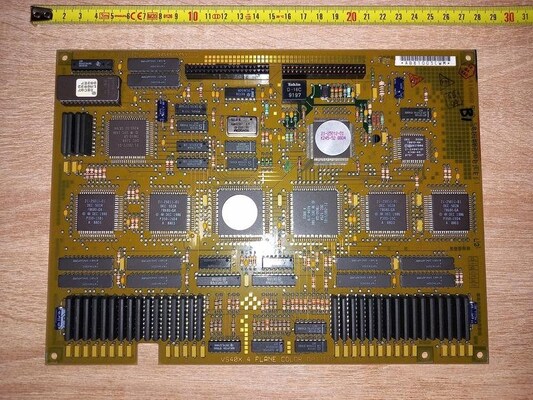
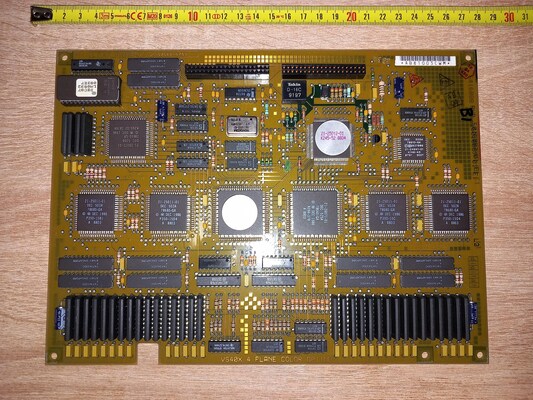
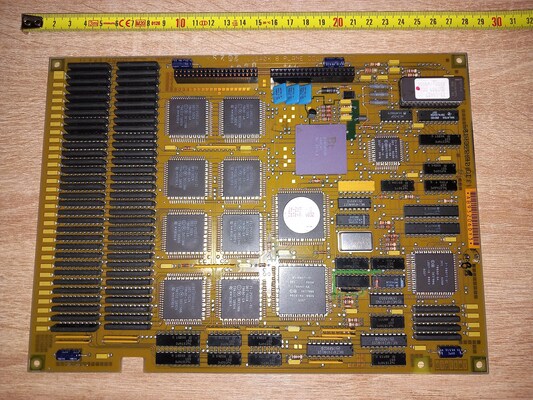
Since you can't easily find good pictures of the colour frame buffer expansion for the VAXstation 3100, here are a couple pictures of mine (follow the links for much larger pictures):
- The four plane variant, with four DC502A chips, one DC503A, one DC525A,
one DC526B, one 21-21553-02 (label hidden due the flash) and one 21-25012-01.
- The eight plane variant, with eight DC502A chips, one DC503A, one DC525A,
one DC526B, one 21-21553-02 and one Bt458. And twice as much memory.
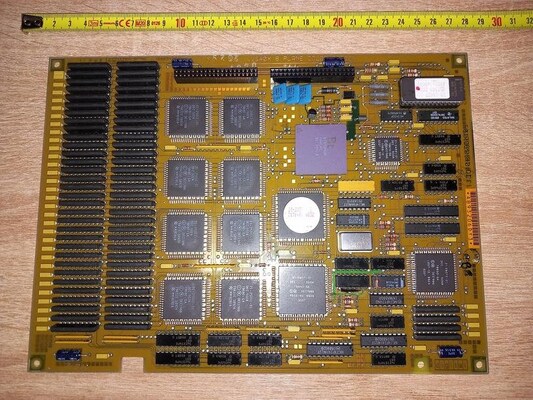
Both frame buffers have the same 1024x864 resolution commonly found on VAX hardware; the difference being that the 4-plane variant can only display 16 different colours, from a 64 colour palette (4:4:4 pixel format), while the 8-plane variant can display 256 different colours from a 16 million colour palette (8:8:8 pixel format)
I don't remember what made me realize that this particular frame buffer was close to the QDSS console board of the VAXstation-II (which, as I mentioned briefly earlier, is a machine running at a whopping 5MHz).
Mind you, for a very long time, VAX systems had no graphics display
capabilities, and were used with terminals (which Digital was
a maker of, with
its VT terminal series).
But as the demand for the ability to run graphics program and windowing systems
arose, Digital built the VCB01 and VCB02 expansion cards for
the MicroVAX-II, which would add a keyboard and mouse controller, as well as a
frame buffer, to turn them into the graphics-capable VAXstation-II.
The VCB01 was known as QVSS (probably short for ``Q-Bus Video
SubSystem''?), and was a monochrome display, while the VCB02, known as
QDSS (probably short for ``Q-Bus Display SubSystem''?) was a
4- or 8-bit colour display.
Here are the pictures of a two boardset VCB02 providing a 4-bit display, courtesy of the VAX Archive.
- M7168 4-plane video memory (two boards could be used to get a 8-bit
display).
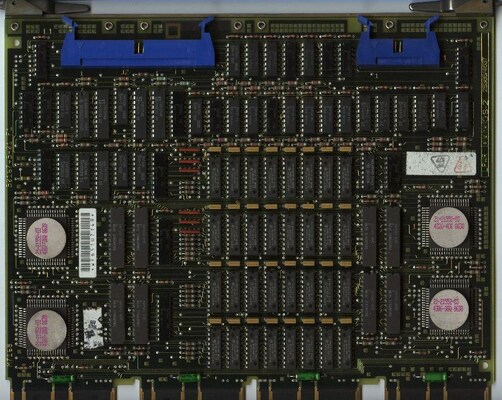
- M7169 control board.
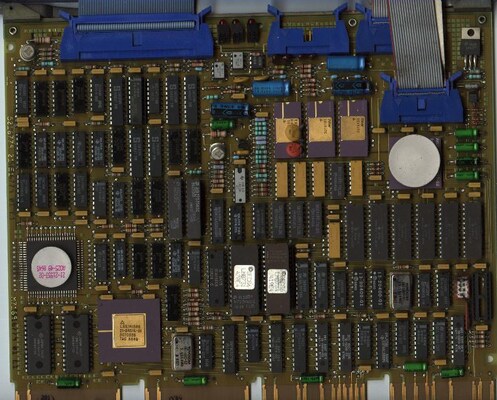
Because these boards had both the keyboard/mouse logic and the display on them,
they were driven, under
Ultrix-11 (Digital's flavour
of Unix for the VAX, heavily based on the BSD code), with a single qv
or qd driver which would provide a terminal emulator.
Ultrix did not have a device-independent "workstation console" or terminal
emulator code for glass displays, and the QVSS and QDSS
terminal capabilities were as scarce as possible.
The termcap description for that terminal was:
 qd|qdss|qdcons|qdss glass tty (4.4 BSD):\
   :am:do=^J:le=^H:bs:cm=\E=%.%.:cl=1^Z:co#128:li#57::nd=^L:up=^K:
which amounted to a clear screen escape sequence (control-z), cursor positioning sequence (escape = row column), cursor up (control-k), cursor right (control-l) and cursor to the topleft corner (control-^).
The QVSS driver did not have any terminal capabilities and ended up being a much simpler driver than QDSS; I have no idea why, as it would had make sense for the monochrome QVSS driver to have the same features (except colour) as the QDSS driver, but maybe this acted as an incentive for people to buy QDSS devices rather than QVSS.
Since Ultrix-11 was sharing a lot of code with BSD Unix, the QDSS and QVSS drivers were contributed back to Berkeley in 1988, and became available in BSD Unix from the 4.3BSD-Reno release onwards.
The QDSS driver was imported first, on january 1987, with the comment "from DEC", while the QVSS driver was imported on july of the same year, with the comment "from Ultrix".
Interestingly, the code contributed by Digital came with a copyright notice referring to specific license terms, but these licence terms did not get added to the BSD source tree.
/************************************************************************
*                                                                       *
*                       Copyright (c) 1985, 1986 by                     *
*               Digital Equipment Corporation, Maynard, MA              *
*                       All rights reserved.                            *
*                                                                       *
*   This software is furnished under a license and may be used and      *
*   copied  only  in accordance with the terms of such license and      *
*   with the  inclusion  of  the  above  copyright  notice.   This      *
*   software  or  any  other copies thereof may not be provided or      *
*   otherwise made available to any other person.  No title to and      *
*   ownership of the software is hereby transferred.                    *
*                                                                       *
*   The information in this software is subject to change  without      *
*   notice  and should not be construed as a commitment by Digital      *
*   Equipment Corporation.                                              *
*                                                                       *
*   Digital assumes no responsibility for the use  or  reliability      *
*   of its software on equipment which is not supplied by Digital.      *
*                                                                       *
*************************************************************************/
A Berkeley copyright notice was added at the top of the file, shortly after modifications to the code started to occur.
/*
 * Copyright (c) 1982, 1986 Regents of the University of California.
 * All rights reserved.  The Berkeley software License Agreement
 * specifies the terms and conditions for redistribution.
 *
 *      @(#)qd.c        1.3  Berkeley  05/26/88
 *
 * derived from: "@(#)qd.c      1.40    ULTRIX  10/2/86";
 */
An updated version from Ultrix was imported in june 1988, to which the local changes were applied once again; the result was released as 4.3BSD-Tahoe.
Shortly after, a final copyright notice text was added, closer to the usual BSD licence blocks we're familiar with:
/*
 * Copyright (c) 1988 Regents of the University of California.
 * All rights reserved.
 *
 * Redistribution and use in source and binary forms are permitted
 * provided that the above copyright notice and this paragraph are
 * duplicated in all such forms and that any documentation,
 * advertising materials, and other materials related to such
 * distribution and use acknowledge that the software was developed
 * by the University of California, Berkeley.  The name of the
 * University may not be used to endorse or promote products derived
 * from this software without specific prior written permission.
 * THIS SOFTWARE IS PROVIDED ``AS IS'' AND WITHOUT ANY EXPRESS OR
 * IMPLIED WARRANTIES, INCLUDING, WITHOUT LIMITATION, THE IMPLIED
 * WARRANTIES OF MERCHANTIBILITY AND FITNESS FOR A PARTICULAR PURPOSE.
 *
 *      @(#)qd.c        1.10 (Berkeley) 08/09/88
 */
The copyright block was modified one last time in june 1990, and present in all 4.4BSD releases:
/*
 * Copyright (c) 1988 Regents of the University of California.
 * All rights reserved.
 *
 * Redistribution and use in source and binary forms, with or without
 * modification, are permitted provided that the following conditions
 * are met:
 * 1. Redistributions of source code must retain the above copyright
 *    notice, this list of conditions and the following disclaimer.
 * 2. Redistributions in binary form must reproduce the above copyright
 *    notice, this list of conditions and the following disclaimer in the
 *    documentation and/or other materials provided with the distribution.
 * 3. All advertising materials mentioning features or use of this software
 *    must display the following acknowledgement:
 *      This product includes software developed by the University of
 *      California, Berkeley and its contributors.
 * 4. Neither the name of the University nor the names of its contributors
 *    may be used to endorse or promote products derived from this software
 *    without specific prior written permission.
 *
 * THIS SOFTWARE IS PROVIDED BY THE REGENTS AND CONTRIBUTORS ``AS IS'' AND
 * ANY EXPRESS OR IMPLIED WARRANTIES, INCLUDING, BUT NOT LIMITED TO, THE
 * IMPLIED WARRANTIES OF MERCHANTABILITY AND FITNESS FOR A PARTICULAR PURPOSE
 * ARE DISCLAIMED.  IN NO EVENT SHALL THE REGENTS OR CONTRIBUTORS BE LIABLE
 * FOR ANY DIRECT, INDIRECT, INCIDENTAL, SPECIAL, EXEMPLARY, OR CONSEQUENTIAL
 * DAMAGES (INCLUDING, BUT NOT LIMITED TO, PROCUREMENT OF SUBSTITUTE GOODS
 * OR SERVICES; LOSS OF USE, DATA, OR PROFITS; OR BUSINESS INTERRUPTION)
 * HOWEVER CAUSED AND ON ANY THEORY OF LIABILITY, WHETHER IN CONTRACT, STRICT
 * LIABILITY, OR TORT (INCLUDING NEGLIGENCE OR OTHERWISE) ARISING IN ANY WAY
 * OUT OF THE USE OF THIS SOFTWARE, EVEN IF ADVISED OF THE POSSIBILITY OF
 * SUCH DAMAGE.
 *
 *      @(#)qd.c        1.16 (Berkeley) 06/28/90
 */
I am not a lawyer, but I assume (maybe incorrectly) that, at this point, Digital had no objection to this file being put under the Berkeley copyright, which would allow me to reuse this code as free software under the usual BSD licence terms, regardless of what was ever written in the license under which the Ultrix code was initially furnished with.
And of course, although there were enough hints that the colour frame buffer option in VAXstation 3100 was based of the same VCB02 hardware, or a minor evolution of it, I needed to tinker a bit to confirm this.
Fortunately, on an installed Ultrix system, the GENERIC kernel configuration file lists the following frame buffer drivers:
#all the workstations
device          qv0     at uba0         csr 0177200 flags 0x0f vector qvkint qvvint
device          qd0     at uba0         csr 0177400 flags 0x0f vector qddint qdaint qdiint
device          qd1     at uba0         csr 0177402 flags 0x0f vector qddint qdaint qdiint
device          sm0     at uba0         csr 0x200f0000 flags 0x0f vector smvint
device          sg0     at uba0         csr 0x3c000000 flags 0x0f vector sgaint sgfint
device          fg0     at ibus?        flags 0x0f vector fgvint
In this listing, qv0 is for QVSS, qd0 and qd1 for up to two QDSS. Then sm0 was obviously the monochrome frame buffer onboard the VAXstation 3100, which was already supported under NetBSD and OpenBSD by the smg driver; sg0 had to be the colour frame buffer.
I had no idea, back then, what fg0 was supposed to be; I eventually learned that this was the driver for the Firefox Graphics board, Firefox being the codename of a particular VAX machine, to which I would port OpenBSD in 2008 (and this is on my list of stories to write down.)
Note that, in the VAX kernel configuration we had inherited from NetBSD, the frame buffers were described as:
smg0            at vsbus0 csr 0x200f0000 # Small monochrome display ctlr.
#clr0           at vsbus0 csr 0x30000000 # 4- or 8-bitplanes color graphics
The device address matched for the monochrome frame buffer, so I could be quite confident the clr0 address was wrong and that 0x3c000000 was where to look at.
The driver being called sg, one could reasonably expect to find hardware information in an sgreg.h header file. Indeed, on Ultrix, there was a /usr/include/machineio/sgreg.h file, which was surprisingly close to the BSD qdreg.h.
(If you don't have an Ultrix installation lying around, you can have a look at this file on the MIT AFS.)
So it was now obvious that the colour frame buffer was using the same graphics chipset as the VCB02, and I spent quite some time getting myself familiar with the 4.4BSD qdss driver.
In what eventually became the OpenBSD/vax gpx(4) driver, the initialization sequence, including a workaround for a bug in an earlier version of the chip, is taken straight from the qdss driver.
Nowadays, there is plenty of information available on this hardware.
- https://gunkies.org/wiki/VCB02_Video_Controller
- http://bitsavers.org/pdf/dec/qbus/VCB02/
- https://vt100.net/dec/ek-104aa-tm-001.pdf
Unfortunately, apart from the technical manual on vt100.net which I was not aware of at that time, none of this information was available in 2006.
Reading the QDSS driver code quickly pointed out that the frame buffer memory was not accessible to the host processor, and every video operation would need to be done through the two processing chips, ADDER and VIPER which together got referred to as the Dragon.
Because of this restriction, the QDSS driver would use a well-known trick of uploading its terminal font to the off-screen (never visible) parts of the frame buffer memory, and output characters by performing screen-to-screen copies of the appropriate character cell. Uploading pixel data was a slow operation, but it only had to be done once, during boot, where some delay was acceptable.
This trick had been common since the dawn of time, on machines where memory
latency and/or bus bandwidth was low, to reduce the actual work on the processor
to display a character, even for graphics hardware where the frame buffer memory
is accessible by the processor.
Many HP frame buffers of the 1980s and early 1990s have extra non-visible
frame buffer memory, sometimes as much as the visible memory, available for that
purpose.
The first task, of the uppermost importance, was to figure out where the Dragon chips were "living", in other words, to which addresses they would answer. The csr locator in the Ultrix configuration file was the base address at which the graphics option slot would answer. But I had no idea how much address lines it would decode - the base address of 0x3c000000 only implied it might decode up to 26 low-order address bits, for a huge 64MB address space. In reality, it was probably much less, first, because this design used to work as Q-Bus expansion boards, and the Q-Bus only has a 22 bit address space (4MB), second, because the frame buffer memory was not made available over the bus, so there would be only a few registers of the various chips exposed, but likely in a sparsely populated memory map, with incomplete address decoding, to save up on complexity in the address decoding logic.
I could have written a dummy driver which would poke every address multiple of
0x100 (256) or 0x200 (512) in the first
megabyte of the address space starting at 0x3c000000, and report
whether it had been able to read something (and which value), or if the read
attempt had failed and triggered a bus timeout.
But I don't remember doing this for that particular driver. Instead, I had
managed to get my hands on the Ultrix sg.c driver source code. I
don't remember where from, though, and I did not keep that file around for
very long. Back then, the only Ultrix source code archive I had was for Ultrix
2.0 which did not support the VAXstation 3100. I later found the now well-known
Ultrix 4.2 source leak, which you can even find on
Github nowadays.
It is very likely that I found that sg.c file somewhere on the
MIT AFS, though, as I was exploring it once a year, trying to find interesting
files (i.e. source code) with not-strict-enough access permissions, and
succeeded a few times.
Regardless of where it came from, the contents of that driver can now be seen
here on Github,
for example.
I spent as little time as possible looking at that file, because I was quite confident that the legally usable QDSS code would cover most of my needs. There were three bits of information I couldn't infer from QDSS alone, and which a quick glance at sg.c provided:
- The offset of the ADDERR chip in the address space (which I could
have found by experimenting). That was easy to find in this block of defines in
sg.c:
/*
 * VAXstar (color option) register address offsets from start of VAXstar (color)
 * address space.
 */

#define ADDER   0x0000    /* ADDER chip address */
#define FCC     0x0200    /* Fifo Compression Chip address */
#define VDAC    0x0300    /* Video DAC address */
#define CUR     0x0400    /* CURsor chip address */
#define VRBACK  0x0500    /* Video ReadBACK address */
#define FIFORAM 0x8000    /* FIFO/template RAM */
- How to tell the 4-plane apart from the 8-plane: the sg.c code
describes a "read back" address, which apparently can read from a fixed part of
the video memory. Upon reset, the video memory is cleared, and reading from it
would return zero, except for the missing planes, leading to different values
read depending on whether there are 4 or 8 planes. The code is quite simple:
/****************************************************************** ** ** ** Routine to figure out the number of planes. ** ** ** ******************************************************************/ sg_get_planes() { register short *sgvrback; register short value; sgvrback = (short *) sgmap.vrback; value = (*sgvrback >> 4) & 0xF; switch (value) { case 8: sg_num_planes = 8; num_colormaps = 255; break; case 0xF: sg_num_planes = 4; num_colormaps = 15; break; default: mprintf("\nsg%d: sg_get_planes: Invalid number of planes"); break; } } - How to access and program the RAMDAC to setup the colour map: the 8 plane
variant uses a good old Brooktree Bt458 chip, for which I had written a lot of
code in the past; but the 4 plane variant doesn't have an off-the-shelf RAMDAC
chip and is specific to this board. Here, the interesting bits were in different
places, mostly a few lines of initialization in sgcons_init, and the
complete sg_load_colormaps routine.
Interestingly, I spent so little time in there gathering this information that I ended up writing a minimalistic layout for the 4-plane RAMDAC:/* 4 plane option RAMDAC */ struct ramdac4 { uint16_t colormap[16]; uint8_t unknown[0x20]; uint16_t cursormap[4]; uint8_t unknown2[0x18]; uint16_t control; #define RAMDAC4_INIT 0x0047 #define RAMDAC4_ENABLE 0x0002 };
...while sgreg.h was much more helpful:/* vdac registers */ struct vdac { u_short a_color_map[16]; /* active region color map */ u_short b_color_map[16]; /* background region color map */ u_short resv1; /* reserved */ u_short b_cur_colorA; /* background cursor color A */ u_short b_cur_colorB; /* background cursor color B */ u_short b_cur_colorC; /* background cursor color C */ u_short resv2; /* reserved */ u_short a_cur_colorA; /* active cursor color A */ u_short a_cur_colorB; /* active cursor color B */ u_short a_cur_colorC; /* active cursor color C */ u_short resv3[8]; /* reserved */ u_short mode; /* mode register */ u_short dadj_sync; /* delay adjust sync */ u_short dadj_blank; /* delay adjust blank */ u_short dadj_active; /* delay adjust active */ u_short mem_read_reg; /* memory read register */ u_short pad[75]; };
And in fact, that struct definition is about the only change between qdreg.h and sgreg.h, but I had been so concentrated on the QDSS code that I had forgotten about it.
With all that newfound knowledge, I started to work on a boilerplate frame buffer driver by then. After mapping the ADDER chip into the kernel memory space, I quickly put the initialization code from the QDSS driver, and extra debug output to mention which point of the initialization sequence had been reached (in case some of the sequence points during the initialization, where the code waits for busy bits to clear, would spin). Such sequence points were, in many places in qd.c, looking like this:
        for (i = 1000, adder->status = 0; i > 0 &&
             !(adder->status&ADDRESS_COMPLETE) ; --i)
                ;
To my immense relief, the initialization sequence completed. Of course, I couldn't see anything on the screen yet, since none of this code was attempting to display anything. But the monitor which was connected to the VAXstation was also not displaying any error, a good sign that the initialization sequence had not forced the RAMDAC to output signal at an unsupported frequency either.
The next step was to reuse the routine loading font data into the non-visible part of the frame buffer memory, from QDSS. I had to tweak it due to the data structures for the console font being slightly different between QDSS and the display fonts (wsfont) in OpenBSD. A few hours of tinkering later, and I had my work-in-progress driver display a few characters on the visible part of the screen.
Yet I was still very far from a working console driver. As I mentioned earlier, QDSS has extremely limited terminal capabilities. If you look at its code, it can paint a character anywhere on the screen, clear the screen, and scroll the terminal one line. The minimal requirements for a decent console under OpenBSD are a bit more complicated:
- Display a character cell anywhere on screen.
- Perform a scroll operation of a subset of the screen, in either the vertical or the horizontal direction.
- Perform a background fill of a subset of the screen.
- Display or hide the cursor, preferrably as an inverted block, so that the character under the cursor may be seen, rather than an opaque block.
Under OpenBSD, these tasks are performed using a set of dedicated routines provided by the frame buffer driver, known as the "emul(ation) ops", and they are conveniently packaged in a dedicated structure declared in sys/dev/wscons/wsdisplayvar.h:
/*
 * Emulation functions, for displays that can support glass-tty terminal
 * emulations.  These are character oriented, with row and column
 * numbers starting at zero in the upper left hand corner of the
 * screen.
 *
 * These are used only when emulating a terminal.  Therefore, displays
 * drivers which cannot emulate terminals do not have to provide them.
 *
 * There is a "void *" cookie provided by the display driver associated
 * with these functions, which is passed to them when they are invoked.
 */
struct wsdisplay_emulops {
        int     (*cursor)(void *c, int on, int row, int col);
        int     (*mapchar)(void *, int, unsigned int *);
        int     (*putchar)(void *c, int row, int col, u_int uc, uint32_t attr);
        int     (*copycols)(void *c, int row, int srccol, int dstcol,
                    int ncols);
        int     (*erasecols)(void *c, int row, int startcol, int ncols,
                    uint32_t);
        int     (*copyrows)(void *c, int srcrow, int dstrow, int nrows);
        int     (*eraserows)(void *c, int row, int nrows, uint32_t attr);
        int     (*pack_attr)(void *c, int fg, int bg, int flags,
                    uint32_t *attrp);
        void    (*unpack_attr)(void *c, uint32_t attr, int *fg, int *bg,
                    int *ul);
};
On non-accelerated frame buffers where the frame buffer memory is accessible to the processor, the rasops (for RASter OPerationS) subsystem provides a complete implementation of these routines; frame buffer drivers can then decide to override some routines when it matters.
In this particular frame buffer case, it made sense to involve the rasops code, and override the routines which would attempt to access the frame buffer memory. This means my driver only had to implement six routines:
- the putchar routine, to display a character.
- the copycols and copyrows routines, to perform screen-to-screen copies, needing for scrolling operations.
- the erasecols and eraserows routines, to perform screen filling, needing for scrolling operations and to clear the screen.
- the rasops-specific do_cursor routine, to invert the contents of a character cell in order to draw the cursor, or undo that drawing.
The putchar task was mostly taken care of by the code borrowed from QDSS. In order to implement the others, I needed to understand how I could perform the appropriate actions by programming the Dragon.
The scroll_up routine in qd.c would be a good starting point. If you look at it, after performing some generic initialization, in particular setting up bit plane masks to make sure all planes would be affected by the operation...
/*
 *  scroll_up()... move the screen up one character height
 */
void
scroll_up(volatile struct adder *adder)
{
        /*
        * setup VIPER operand control registers
        */
        (void)wait_status(adder, ADDRESS_COMPLETE);
        write_ID(adder, CS_UPDATE_MASK, 0x00FF);  /* select all planes */
        write_ID(adder, MASK_1, 0xFFFF);
        write_ID(adder, VIPER_Z_LOAD | FOREGROUND_COLOR_Z, 255);
        write_ID(adder, VIPER_Z_LOAD | BACKGROUND_COLOR_Z, 0);
        write_ID(adder, SRC1_OCR_B,
        EXT_NONE | INT_SOURCE | ID | BAR_SHIFT_DELAY);
        write_ID(adder, DST_OCR_B,
        EXT_NONE | INT_NONE | NO_ID | NO_BAR_SHIFT_DELAY);
...it loads a destination rectangular area, a source rectangular area, and writes to the command register.
        /*
         * load DESTINATION origin and vectors
         */
        adder->fast_dest_dy = 0;
        adder->slow_dest_dx = 0;
        adder->error_1 = 0;
        adder->error_2 = 0;
        adder->rasterop_mode = DST_WRITE_ENABLE | NORMAL;
        adder->destination_x = 0;
        adder->fast_dest_dx = 1024;
        adder->destination_y = 0;
        adder->slow_dest_dy = 864 - CHAR_HEIGHT;
        /*
         * load SOURCE origin and vectors
         */
        adder->source_1_x = 0;
        adder->source_1_dx = 1024;
        adder->source_1_y = 0 + CHAR_HEIGHT;
        adder->source_1_dy = 864 - CHAR_HEIGHT;
        write_ID(adder, LU_FUNCTION_R1, FULL_SRC_RESOLUTION | LF_SOURCE);
        adder->cmd = RASTEROP | OCRB | 0 | S1E | DTE;
Then a second operation is performed, to clear the last line.
        /*
         * do a rectangle clear of last screen line
         */
        write_ID(adder, MASK_1, 0xffff);
        write_ID(adder, SOURCE, 0xffff);
        write_ID(adder,DST_OCR_B,
        (EXT_NONE | INT_NONE | NO_ID | NO_BAR_SHIFT_DELAY));
        write_ID(adder, VIPER_Z_LOAD | FOREGROUND_COLOR_Z, 0);
        adder->error_1 = 0;
        adder->error_2 = 0;
        adder->slow_dest_dx = 0;                /* set up the width of  */
        adder->slow_dest_dy = CHAR_HEIGHT;      /* rectangle */
        adder->rasterop_mode = (NORMAL | DST_WRITE_ENABLE) ;
        (void)wait_status(adder, RASTEROP_COMPLETE);
        adder->destination_x = 0;
        adder->destination_y = 864 - CHAR_HEIGHT;
        adder->fast_dest_dx = 1024;     /* set up the height    */
        adder->fast_dest_dy = 0;        /* of rectangle         */
        write_ID(adder, LU_FUNCTION_R2, (FULL_SRC_RESOLUTION | LF_SOURCE));
        adder->cmd = (RASTEROP | OCRB | LF_R2 | DTE ) ;

} /* scroll_up */
This gave me a good hint of how I could get the Dragon to work for me. I could setup destination and source areas, and write the magic RASTEROP command to the command register to have it perform the operation I need. The next step was to investigate which such operations were available and how to use them.
Quite quickly, this led to the introduction of two routines in my code, gpx_copyrect to perform a screen-to-screen copy, and gpx_fillrect to perform a screen fill. The copycols and copyrows operations would become simple wrappers around gpx_copyrect, while the erasecols and eraserows operations would become simple wrappers around gpx_fillrect.
This was enough to get a decently working console, although I did not have an inverted cursor yet. But scrolling would work, and I could start using vi to test proper operation (in particular, deleting N characters at once with Nx in vi is a very simple way to test the horizontal scrolling operation, i.e. copycols and erasecols.)
More tinkering led me to understand that every RASTEROP command would pass the number of a Logical Function in some of its low bits, as listed in qdreg.h:
/* ADDER command register [8], [10] */

#define OCR_zero                0x0000
#define Z_BLOCK0                0x0000
#define OCRA                    0x0000
#define OCRB                    0x0004
#define RASTEROP                0x02c0
#define PBT                     0x03c0
#define BTPZ                    0x0bb0
#define PTBZ                    0x07a0
#define DTE                     0x0400
#define S1E                     0x0800
#define S2E                     0x1000
#define VIPER_Z_LOAD            0x01A0
#define ID_LOAD                 0x0100
#define CANCEL                  0x0000
#define LF_R1                   0x0000
#define LF_R2                   0x0010
#define LF_R3                   0x0020
#define LF_R4                   0x0030
These are the LF_R# values above. Each of these four logical functions used by the ADDER could be programmed in the VIPER registers:
/* VIPER registers */

[...]
#define LU_FUNCTION_R1          0x0084
#define LU_FUNCTION_R2          0x0085
#define LU_FUNCTION_R3          0x0086
#define LU_FUNCTION_R4          0x0087
[...]

/* VIPER logical function unit codes */

#define LF_ZEROS                0x0000
#define LF_NOT_D                0x0003
#define LF_D_XOR_S              0x0006
#define LF_D                    0x000c
#define LF_SOURCE               0x000a
#define LF_D_OR_S               0x000d
#define LF_ONES                 0x000f
Having four ready-to-use logical functions which I would not need to rewrite was perfect for my needs, as I needed exactly four, and this ended up nicely in my code at the end of gpx_reset_viper:
        /*
         * Init Logic Unit Function registers.
         */
        /* putchar */
        gpx_viper_write(ss, LU_FUNCTION_R1, FULL_SRC_RESOLUTION | LF_SOURCE);
        /* erase{cols,rows} */
        gpx_viper_write(ss, LU_FUNCTION_R2, FULL_SRC_RESOLUTION | LF_ZEROS);
        /* underline */
        gpx_viper_write(ss, LU_FUNCTION_R3, FULL_SRC_RESOLUTION | LF_ONES);
        /* cursor */
        gpx_viper_write(ss, LU_FUNCTION_R4, FULL_SRC_RESOLUTION | LF_NOT_D);
And then I could pick the appropriate function to use, depending on the kind of operation I wanted to perform. And the last one allowed me to get the inverted cursor by performing a gpx_fillrect with that particular logical function.
An almost complete driver got commited near the end of july 2006.
Minor tweaks and fixes occurred during the next three days.
First, after noticing that the upload interface used a 16-bit wide register, I was able to make the code uploading the font image to the off-screen memory work with fonts larger than 8 bits. This allowed me to switch from the 8x15 ROM font to the larger 12x22 Gallant font preferred in OpenBSD (until it got replaced with the Spleen console font), which was better suited to that 1024x864 frame buffer, leading to a 85x39 terminal instead of 128x57.
Second, it did not take too much tinkering to be able to enable colour. All frame buffer operations in qd.c were loading two VIPER registers:
        write_ID(adder, VIPER_Z_LOAD | FOREGROUND_COLOR_Z, 255);
        write_ID(adder, VIPER_Z_LOAD | BACKGROUND_COLOR_Z, 0);
...except the blitc routine painting characters, which would use 1 instead of 255. I quickly realized that I could use a colour index here for painting operations. A few trials later, I had the kernel booting on the frame buffer console with the usual (for OpenBSD) white on blue kernel messages.
All this work, from diving into the QDSS code to a working frame buffer driver for OpenBSD, took four days, from tuesday evening to friday evening when it got commited. Then three more days of testing and bugfixing. During that week, in Toulouse where I lived back then, the temperatures were very hot, with over 35C in the afternoon and still 19C at dawn. As I was working on this driver at home in the evenings, from 9pm to midnight or shortly after, the outside temperature was still over 30C (except on friday where the temperature was slightly more bearable, around 27C). With all the computers running in my machineroom, the temperature in there was way above 30C, and I could not sit there as I would usually do.
This makes that driver the first - and so far the only - OpenBSD driver which I worked on in a different room than the hardware was in. I was working on the code in the living room, from a small laptop running ssh connexions to all my machines, and only standing up and having a look at the VAXstation display in the machineroom from the doorway to check if things had displayed correctly. Only in the later days, when I needed to run vi on the machine, did I enter the machine room.
But, hey, when you're trying to tame a chipset called Dragon, the least you can expect is some real heat.
A few months later, I managed to buy a 4-plane board on eBay, which allowed me to try my code on it. It worked out of the box, except for the colours, which were completely wrong; the fix was trivial, I had not programmed the 4bpp colour palette correctly. The RAMDAC initialization sequence for that model also enabled the hardware cursor, which required me to set up its own palette to make it invisible (while a better fix would have been to disable the hardware cursor by changing the magic initialization value 0x47 obtained from sg.c to 0x46, but I did not think of looking again at that file for better clues.)
Not much happened to this driver after that; I had wanted to investigate what could be done to let an X server work with this frame buffer (unlike QDSS, DMA could not be used, or at least not as easily), but always had something more important to spend time on.
Eventually, when OpenBSD/vax got retired in march 2016, this driver was retired as well. But thanks to the efforts of Izumi Tsutsui, that driver eventually got ported to NetBSD in 2023.
The QDSS driver also exists in NetBSD, originating from 4.4BSD, but has never been enabled in any kernel configuration; it is unknown whether there are still people with VAXstation II in working condition, who could give it a try (assuming it still compiles); but factoring the common Dragon code between gpx and QDSS could be an interesting cleanup project, if only to modernize QDSS to get better terminal capabilities.
But does any of this really matter in 2025? (Apart from me being able to brag about having been able to once tame dragons, that is.)